Track, Forecast & Allocate Your AI Spend
Pull your AI spend from multiple providers into one place, every day. Set budgets, split spend by client, team and user, create AI cost allocations, and keep track of every dollar spent.
14 days free · no card required
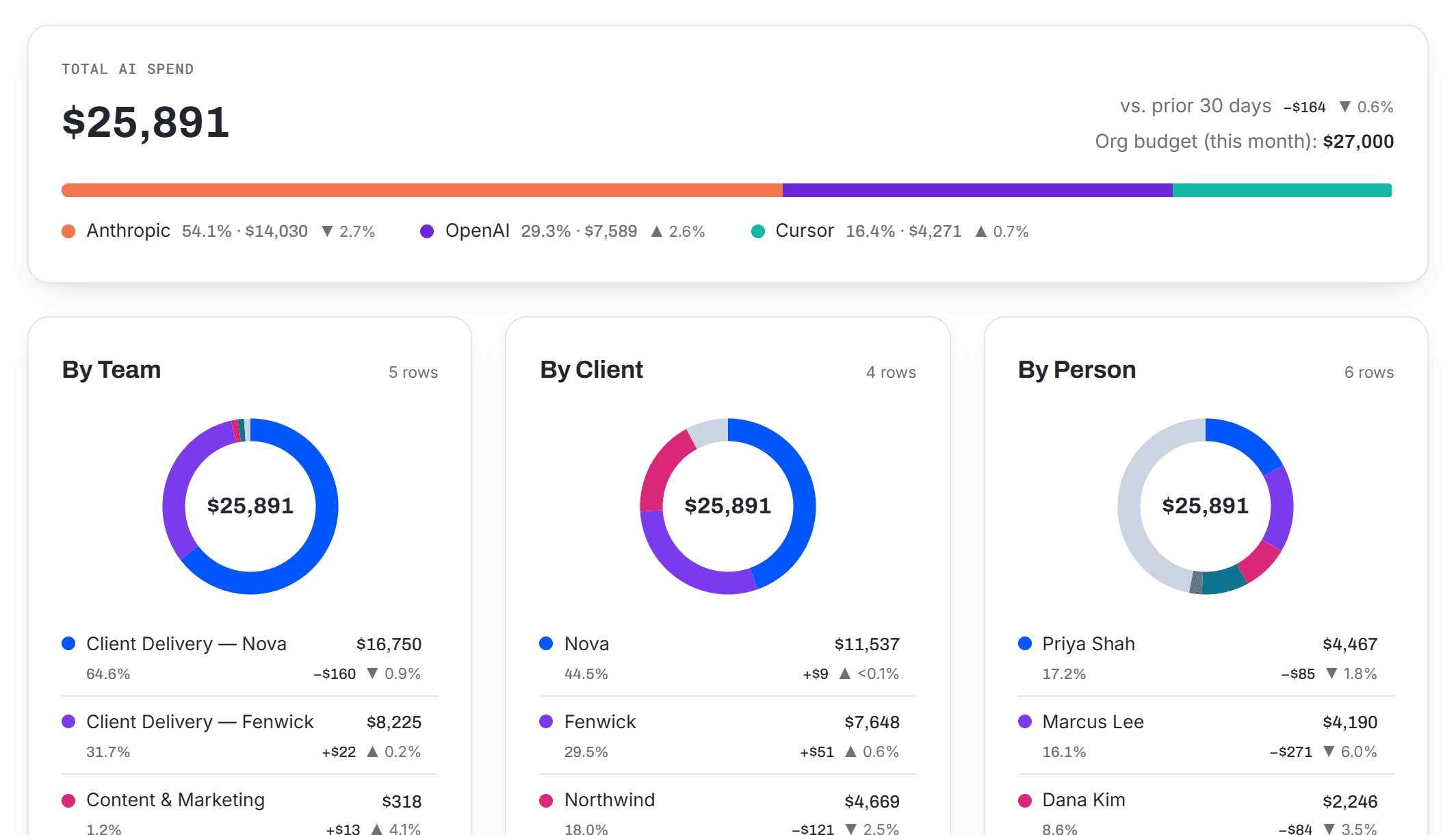
Sample data from a demo company
Today’s AI tools are built for engineers, not for FinOps teams who have to budget, allocate and explain that spend.
Every provider has its own analytics console. Nobody sees total AI spend across all of them in one place.
Companies set a budget for token spend but lack the ability to set, track and control budgets for a specific team, customer, project or user.
Someone exports multiple CSVs and stitches them together to match multiple invoices, without gaining any insight into how the money was spent.
AI spend, turned into financial answers
Provider consoles tell you what an API key cost. Vensal tells you what a client, a team, and this quarter cost, and what next month will.
Provider consoles connected and updated daily, with a year of history from the day you connect. Spend from any other AI tool can be uploaded and turned into structured data.
See exactly what each client's work cost in AI, month by month, so it can go on their invoice.
Set monthly budgets by client, team, department, or provider, and see where the month will land if the pace holds.
When someone changes teams, the move is dated — so last quarter's numbers stay where they were.
Set up in an afternoon. No engineering required.
Vensal reads each provider's own billing data once a day. It never sees requests, never changes how your team uses AI, and has no access to prompts or completions.
- 1Connect your providers
Add an admin API key for each provider. Vensal checks it works, stores it in AWS Secrets Manager, and imports your last 12 months. Vensal never sees your prompts or completions.
- 2Map your clients and teams
Tell Vensal who works on what, and which provider workspace belongs to which client — directly in the app, or by uploading one mapping spreadsheet.
- 3Set budgets & visualize the numbers
Every day, spend is imported, split by client, team, and person, compared to budget, and used to forecast future spend.
Priced by team size. Every feature on every plan.
Best for a founder, startup or a small team getting one clear number.
Start free trialBest for small agencies, law firms, studios, and teams with multiple clients.
Start free trialBest for larger teams with many cross-functional departments.
Start free trialCompanies with strict budgets to hold and large overhead allocations.
Start free trial14-day free trial · no card required · cancel anytime
Frequently Asked Questions
Do you see our prompts or responses?
No. Vensal reads the same cost and usage figures your providers show in their own billing consoles — dollars, tokens, models, and workspaces. Prompt and completion content is never requested and never stored.
How does Vensal get our spend data?
You connect each provider once with an admin API key. Vensal pulls billing and usage once a day, and imports the last 12 months as soon as you connect. It never sits between your team and the provider, so nothing about how your team uses AI changes.
Where are our provider keys stored?
In AWS Secrets Manager. Vensal's own database only ever holds a pointer to a key, never the key itself.
Which providers are supported?
Anthropic and OpenAI connect directly today, and Cursor, Gemini and more are on the way. For any AI tool without a direct connection, you can upload spend from its invoice or CSV export. It shows alongside everything else, labelled as an upload.
Can Vensal always tell which person spent what?
Only when the provider reports it. Anthropic, for example, names a person for Claude Code usage but only an API key for other API usage. You can link keys and workspaces to teams and clients on Vensal's Organization screen. Spend that can't be tied to a person, team, or client is shown as unallocated — never guessed.
What counts toward my plan?
The number of people whose AI spend Vensal tracks — not the number of people who log in. Every plan includes every feature; the price only changes with team size.
What happens when the free trial ends?
The trial lasts 14 days and needs no card. Choose a plan any time to keep going. If you don't, your account becomes read-only — your data stays visible — and it's archived 15 days after that. Adding a card brings it back.
Can I cancel anytime?
Yes, from Manage billing inside the app. You keep full access until the end of the period you've already paid for. We don't give partial refunds — see Refunds & Cancellation for the details.
What if we track more than 99 people?
That's Enterprise. Talk to us and we'll set it up with you.
Stop guessing what you'll owe next month
Connect your providers and see this month's spend, split by client and team, today.
Start free trial14 days free · no card required